Writing with AI
AI writing is built into the places you already work, always as drafts you review. Nothing the AI writes goes live without you pressing publish. Every AI button shows its credit cost up front; see Credits.
The five tools
Section titled “The five tools”| Where | Button | What it does | Credits |
|---|---|---|---|
| Page editor | Compose this page with AI | Describe the page in a sentence; AI builds the whole section stack for you to edit. Replaces existing sections if there are any. | 4 |
| Any section | Redraft with AI | Rewrites that one section’s copy; layout and images untouched. | 2 |
| Page editor | Generate SEO with AI | Fills the SEO title and meta description. | 1 |
| Blog / area guide editor | Draft with AI | Writes a first-draft body from your title, straight into the editor. | 3 |
| Blog / area guide lists | Generate article / Generate area guide | The full pipeline: researches the web, writes a grounded draft with links, SEO, FAQ and suggested images. Runs in the background for around ten minutes. | up to 20, charged only on success |
The background generator shows its progress live in your content list (researching, writing, quality-checking, checking links, finding images) and finishes with Draft ready to review. Full walkthrough: Blog & area guides.
There’s also Topic ideas (free) in the blog and area-guide lists: suggested topics scored out of 100 for opportunity, with search volumes and “In the news” prompts, each one click away from the generator.
The guardrails
Section titled “The guardrails”The AI works to strict rules you can rely on:
- Drafts only. Everything lands as a draft for you to edit and publish.
- No invented facts. It won’t assert prices, floor areas, EPC ratings, tenure terms, council-tax bands or statistics it can’t verify; researched articles only link to sources from their research.
- Quality-checked. Every researched article passes an independent AI quality check before it reaches you, and is rewritten until it does.
- Legal content is off-limits. Legal and Material Information content is structurally excluded from AI composition; compliance content always comes from you.
Teach it your voice
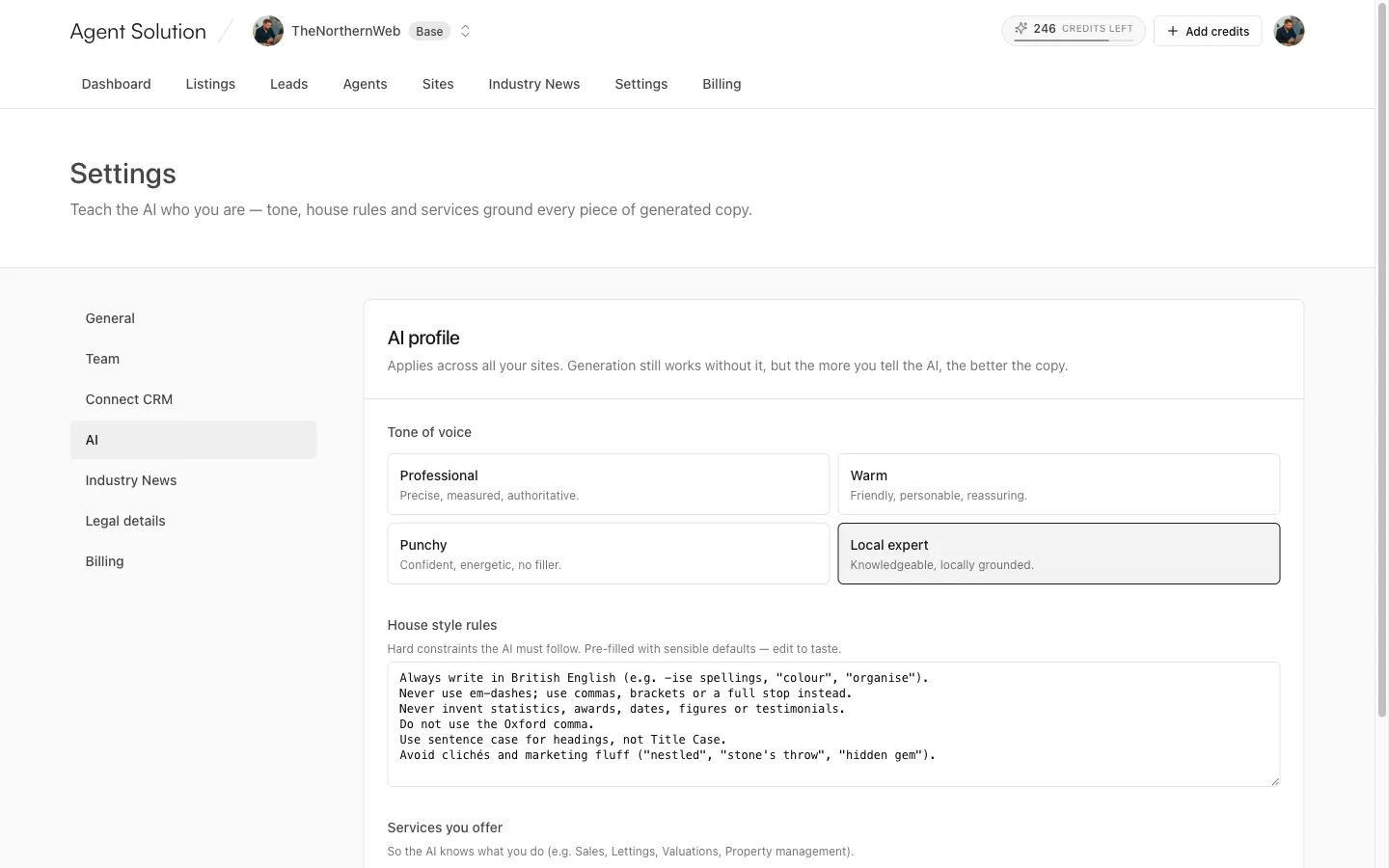
Section titled “Teach it your voice”Settings → AI is the AI profile that grounds everything generated across all your sites:
- Tone of voice: Professional, Warm, Punchy, or Local expert.
- House style rules: hard constraints the AI must follow, pre-filled with sensible defaults you can edit.
- Services you offer: tags (Sales, Lettings, Valuations, Property management and so on) so the AI knows what you actually do.
Generation works without it, but the more you tell the AI, the more the copy sounds like you. Owners and admins can edit it; editors can view it.